One editor —
AI in, print-ready out.
The same designer your team uses is the one buyers use on the storefront. Generate art from a prompt, place it on a real print canvas, and get mockups that look sellable. Placements, methods, embroidery, and proofing — all in one place.
Generate, place, preview, prove — then print.
Generate or upload art
Text-to-image AI, or bring your own artwork.
Place on the canvas
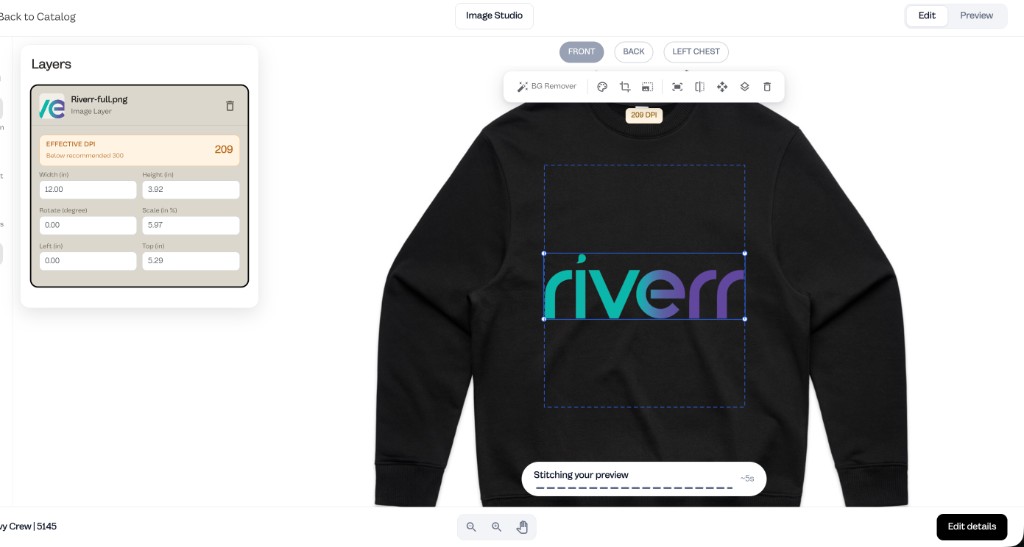
Real print areas, placements, and DPI checks keep it print-ready.
Preview the result
Sellable mockups and live embroidered previews follow automatically.
Send to production
Proofing connects to quotes and orders so bad art never hits the press.
One editor for AI, placements, embroidery, and proofing.
Design anything
- Real print canvas with placements, print areas, and DPI checks
- Admin and buyer customizer flows
- Decorations: DTG, DTF, screen, embroidery, puff, sublimation, and more
- Text-to-image AI, background removal, and sellable mockups inside the editor
Embroidery, built in
- Ghost / on-model mockups generated automatically
- Embroidery: live stitch preview and automatic stitch counts
- Machine-ready export (DST, PES, JEF, EXP, VP3)
- Thread palettes (Isacord, Madeira, Brother, and more)
Watch artwork become stitches.
Live embroidered preview in the customizer, with machine-ready files and automatic stitch counts.
Artwork in. DST out — with stitch counts.
Questions, answered.
Do buyers use the same customizer as my team?
Yes — the same editor powers admin design work and the buyer-facing flow on your storefront.
Can it generate artwork?
Text-to-image AI, background removal, and automatic mockups are built into the editor.
What embroidery files does it export?
Machine-ready DST plus PES, JEF, EXP, and VP3, with stitch counts calculated automatically for pricing.
Does it check print quality?
The canvas runs DPI checks and proofing tied to quotes and orders, so low-res art gets caught before the press.
Design it. Sell it. Print it.
Try the live designer — no account needed.