task
Bring in house finished goods
Last updated October 23, 2026
Stock type: Finished goods. You own them. They were never a blank and they are never decorated.
Do not use this for a run you are printing now. That is a house stock order. Do not use this for a seller's box. That is seller receiving.
Before you start
Mark the base product as a Finished good in its settings. That keeps it off the press: sellers skip the designer, and Riverr never prints it. Finished goods then show on House retail, not Blanks.
Where it ends up
Inventory → Stock → House retail, in a house slot.

Path A: you bought them (purchase order)
Same door as blanks. See Buy and receive house blanks for the full receive page.
- Inventory → Purchase orders: add the product and send the purchase order. Units count as Incoming once it is sent.
- When it arrives, open the purchase order and press Confirm receiving. Count what is in the box.
- Press Confirm receive. On hand goes up by what you counted. Units over the ordered quantity are added as overage.
- Put away into a house slot from Inventory → Tasks if a putaway task opened. For a finished good not tracked by bin, the putaway only records where the units sit.
Path B: it is already on the shelf
- Inventory → Stock → Add inventory.
- Upload your count as a CSV. Rows match by barcode, SKU, product name and options, or style, color, and size. A row with no match can be created as a finished good from the file with Create as finished good.
- Review the matches, choose This is my count or Add to what is there, and click Import. Add a Bin column if you want the file to say where each item sits.
This does not consume blanks. You are writing down what is already there. Details: Import your current inventory.
Path C: a house box turned up unannounced
- Inventory → Receiving, then Log unannounced arrival. This button shows when the 3PL program is on.
- Whose is it? Ours.
- Start receiving, count, confirm, put away.
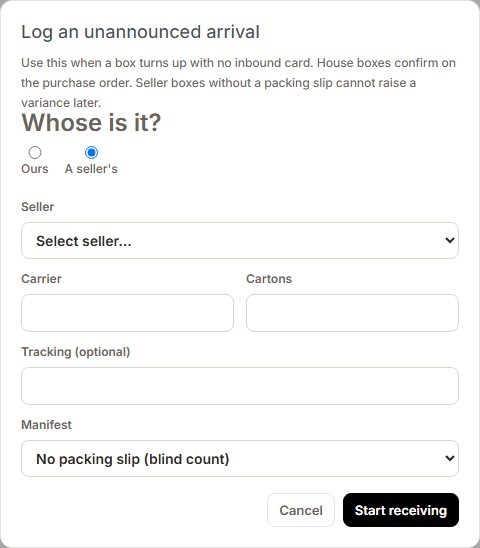
If the box belongs to a purchase order you placed, receive it on that purchase order instead. House arrivals do not open a seller variance.
After that
A finished good is reserved the moment a customer order for it comes in. When that order's batch is created, the units come off on hand, as many as are there. The pick task is then the walk to the shelf and into the shipping bin with the rest of the order. Units the batch could not take wait for new stock and go on the next purchase order. See Produce an order with print and stocked items.
The numbers are explained in What On hand, Reserved, Required, and Incoming mean.