task
Add inventory and log an arrival
Last updated October 23, 2026
Use these when there is no live purchase order and no stock order to receive against. You are writing down what is already here, or a box turned up without a shipment.
The type still has to match What lives in the warehouse. Adding house finished goods does not consume blanks.
Add inventory (already on the shelf)
Inventory → Stock → Add inventory
Add inventory imports your current counts from any spreadsheet saved as a CSV: blanks, house finished goods, and stock you hold for sellers. You check the matches, choose This is my count or Add to what is there, and can undo the import for 24 hours.
Full steps: Import your current inventory.
To change one number instead, edit On hand on the row on the Stock page. An item tracked by bin is changed through its bins: Set locations, a putaway, or a count.
With stock by location on, blank rows land at the location you are on, or at Import into. On the totals view they are refused with Pick a warehouse to edit stock.
Log an arrival (unannounced box)
Inventory → Receiving → Log unannounced arrival
The button shows when the 3PL program is on.
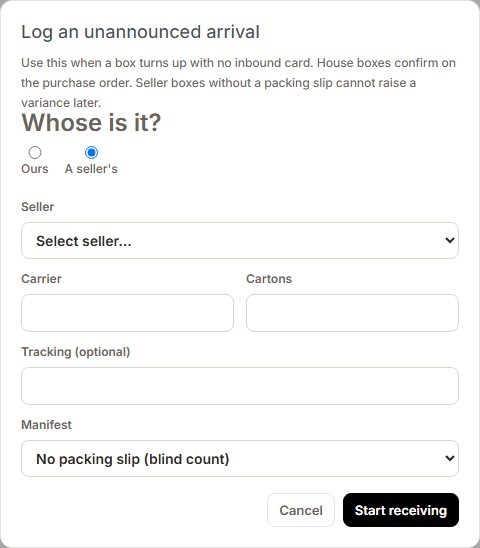
- Whose is it? Ours or A seller's.
- If a seller's, pick the Seller.
- Carrier, Cartons, and Tracking (optional).
- Manifest (seller boxes): I have a packing slip (you enter declared while counting) or No packing slip (blind count).
- Start receiving, count, confirm, put away.
Stock that is not tracked by bin is counted in when you confirm. The putaway then records where it sits. Stock tracked by bin goes up as you place it.
House boxes are always a blind count, so they cannot raise a variance. A seller box with no packing slip cannot raise one later either.
If a house box belongs to a purchase order you placed, receive it on that purchase order instead. See Buy and receive house blanks.
Which button
| Situation | Use |
|---|---|
| Supplier purchase order you placed | Confirm receiving on the purchase order, not these buttons |
| Supplier sent more than you ordered | Enter everything that arrived in This shipment on the purchase order. The extra is added as overage |
| Printing a run now | Stock order |
| Already on the shelf, no document | Add inventory |
| Box at the dock, no inbound card | Log unannounced arrival |
| A seller shipping goods in | Their shipment on Inventory → Receiving. See Receive a seller shipment |