concept
Capacity: why inbound is blocked
Last updated October 23, 2026
Space is counted in bins, at three levels. There is no unit ceiling per product. We do not promise space we do not have.
| Level | Who sets it | What it stops |
|---|---|---|
| Slot fill | You, per slot | Nothing. It tells the picker how much fits |
| Each seller's space | You, on 3PL → Sellers | A seller shipment that needs more bins than the seller has |
| The whole floor | Stop inbound at %, and the bins you hold for house stock | Seller shipments go to Needs your OK, and receiving stops at the stop level |
Slot fill (for the floor)
How many tee equivalents fit on one slot, for example A-02-3. Set it with Capacity when you generate an aisle, or change it on the slot. This is a physical fit number for the picker.
Each seller's space
You give each seller a number of bins when you approve them, and change it with Change space on 3PL → Sellers. Empty means no limit. It is not a cap on each product. See Approve a seller to store inventory.
When a seller sends inventory, Riverr adds the bins they use, the bins already on the way, and the bins this shipment needs. If that is more than their space, they cannot submit. They see This needs N more bins than you have. and can ask you for more space. The request shows under Waiting on you on 3PL → Sellers.
A stock order you place for a seller shows Seller cap after this against the same space.
The whole floor
Occupancy is occupied bins versus bins on the floor. A house blank already on a slot counts.
Bins held for house stock
On Settings → Inventory → 3PL program, Bins held for house stock keeps bins out of the sellers' reach, by type: Tees and default, Hoodies, Jackets, Pants and shorts, Hats and caps, Accessories and stickers.
- Tick Hold for a type and enter Bins.
- Click Save holds.
- Release gives that type's bins back to sellers.
The card shows how many bins are held and how many house stock uses right now. If you run more than one warehouse, pick it under Warehouse first.
When a seller shipment needs your OK
A seller's new shipment comes to you as Needs your OK instead of Expected when either is true:
- The floor would run out of bins once this shipment and everything already on its way arrive.
- Seller stock would fill every bin not held for house stock.
The seller sees that you are confirming space and holds the boxes. You click Accept shipment or Decline on Inventory → Receiving. See Receive a seller shipment.
When receiving is refused
Confirming a seller shipment at receiving is refused while either is true:
- Occupancy reaches Stop inbound at % (95% unless you change it).
- Seller stock already fills every bin not held for house stock.
The message starts Inbound is blocked. For the second case it adds The rest of the warehouse is held for house stock.
Sellers never see the stop percentage or how full the building is. They only see that you are confirming space.
Where to look
- Settings → Inventory → 3PL program → When the warehouse is full: Stop inbound at % (50 to 100)
- Settings → Inventory → 3PL program → Bins held for house stock
- 3PL → Sellers: each seller's space, and space requests
- Settings → Inventory → Warehouse → Bins: occupancy bar, Bins on the floor, Bin granularity, Units per bin
- Settings → Inventory → Warehouse → Floor: the same occupancy bar above the floor
- 3PL → Products: floor occupied %
Bin defaults
On Warehouse → Bins:
- Bin granularity: how putaway splits stock: one bin per variant (size and color), per color, or per product
- Units per bin: typical units that fit, for tee, hoodie, jacket, pant, hat, and accessory. Used to estimate how many bins an inbound shipment needs
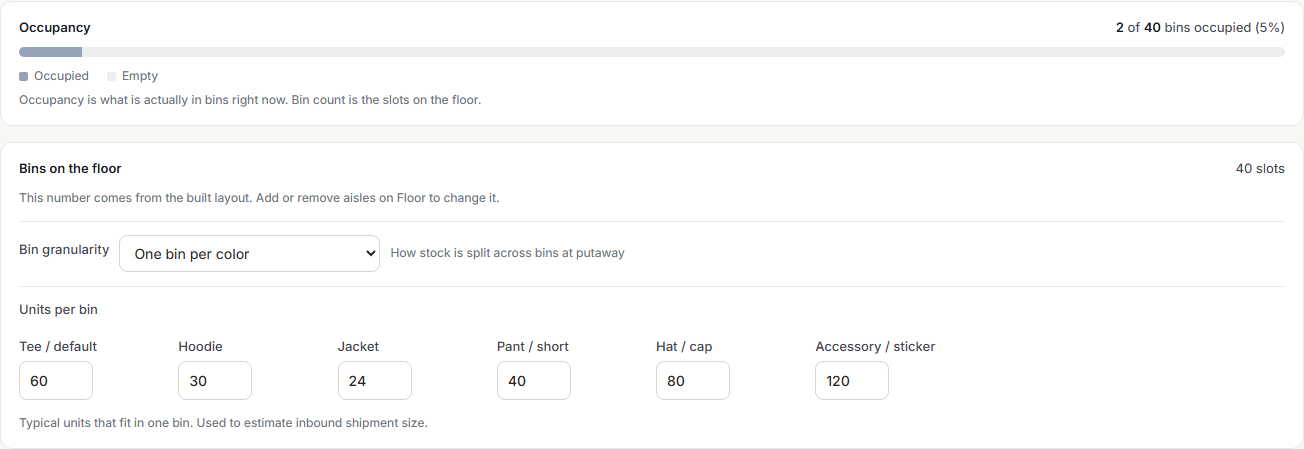
These defaults do not change the bin count. Adding or removing aisles on Floor does.
When someone hits a limit
| What they hit | Look here |
|---|---|
| Seller cannot submit a shipment | Their space on 3PL → Sellers, and any space request under Waiting on you |
| Shipment shows Needs your OK | The floor would run out of bins with everything already on its way, or house holds leave no room. Accept or decline it on Inventory → Receiving |
| You cannot confirm a seller shipment | Occupancy and Stop inbound at %, or Bins held for house stock |
| Stock order for a seller says Over your bin limit | That seller's space on 3PL → Sellers |
| Putaway refused | Wrong owner already on the slot, not capacity |
| A product is flagged on a shipment | Your What we accept from sellers rules, not capacity |