concept
What On hand, Reserved, Required, and Incoming mean
Last updated October 23, 2026
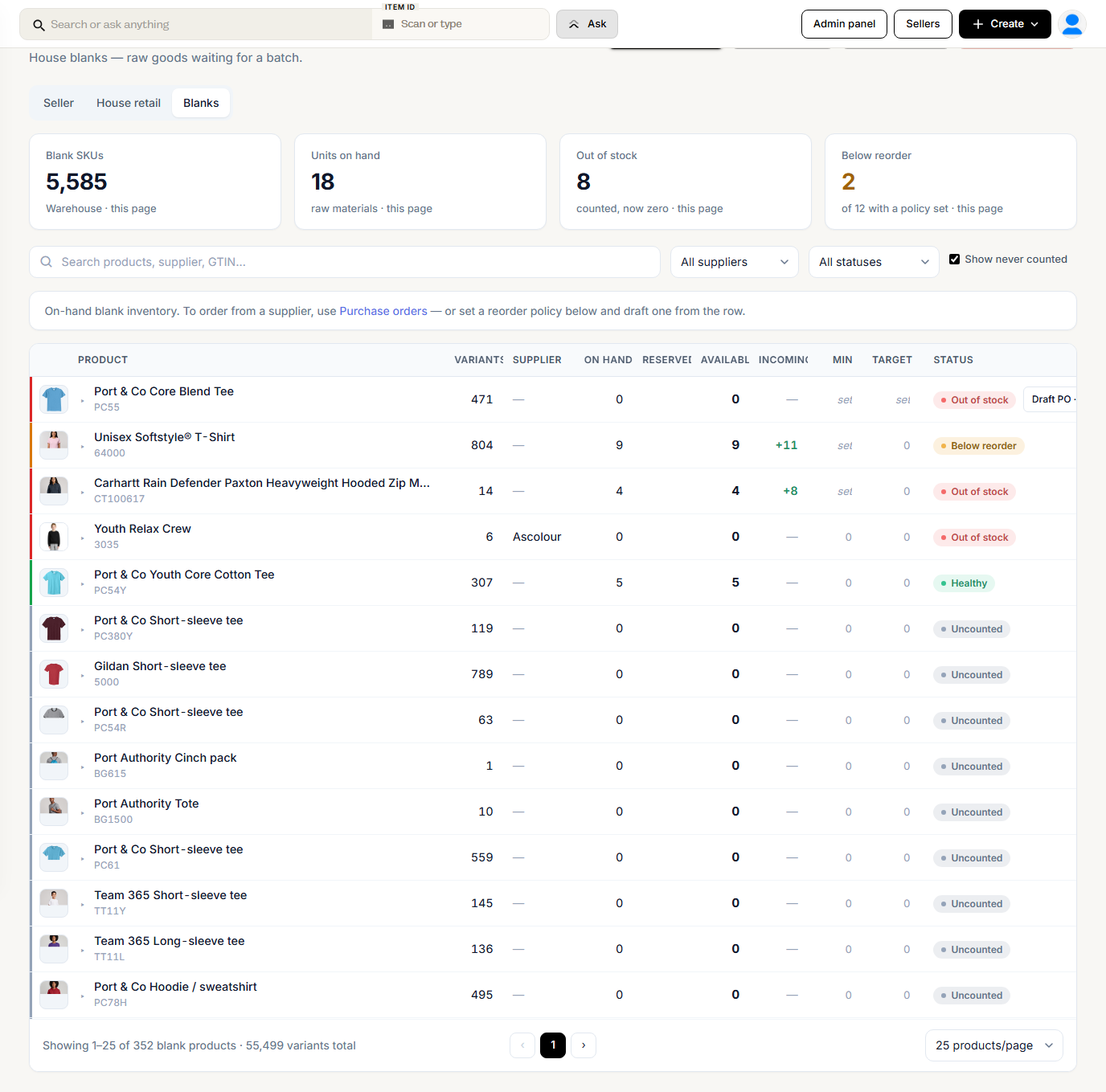
Every blank on Inventory → Stock → Blanks carries a few numbers. Finished goods on House retail use the same ones. This article explains what each number means and exactly when it moves.
The numbers
| Column | What it means |
|---|---|
| On hand | Units physically on your shelves |
| Reserved | Units held for open order lines that are not batched yet |
| Available | On hand minus Reserved. Never shown below zero |
| Incoming | Units on purchase orders you have sent and not received yet |
| Min and Target | Your reorder levels. Below Min, the row is flagged for reorder |
| Lasts | How long Available lasts at the rate you have used it lately. Under it, Fast, Steady, or Slow, a Seasonal label, or Not moving for stock with no use in 90 days |
| Suggested | The Min and Target Riverr would set from your use and the supplier's lead time, with Apply. A Why line shows when known demand raised it, for example a store that closes soon |
Lasts, Suggested, Not moving, and Running low are explained in Plan what to keep in stock. Suggestions never count Reserved twice: open orders already sit in Reserved, so they lower Available rather than raise Min.
Required is a fifth number Riverr keeps for every blank. It is the demand from open order lines that stock has not covered yet. It is not a column on the Stock page. It is what a purchase order made with Import from Batches buys for.
When each number changes
| What happens | On hand | Reserved | Required | Incoming |
|---|---|---|---|---|
| Order line created for the blank | Up by the line | Up by the line | ||
| Line cancelled, ignored, deleted, or unlinked from the blank before batching | Down | Down | ||
| Line shipped without going through production | Down | Down | ||
| Batch created | Down by what the batch takes, up to the line | Down | Down by what the batch took | |
| Line unbatched | Back up by what the batch took | Up again | Back up | |
| Line sent back after a failed QC (blank wasted) | No change | Up again | Back up | |
| Purchase order sent | Down, by up to the line quantity | Up | ||
| Purchase order received | Up by the shelf units | Down | ||
| Rest of a purchase order line closed with Close the rest | Back up, for units still needed | Down | ||
| Purchase order cancelled or deleted, or a line removed | Down | |||
| Add inventory, a count, or an edit | Set or added |
Drafts do not count. A purchase order adds to Incoming only once it is sent (Sent, In transit, or Arrived).

A batch takes what is on hand
When you create a batch, Riverr looks at each line on its own and takes what is on hand, up to the line quantity:
- Enough on hand for the whole line: the batch takes the full quantity. On hand drops and Required drops by the same amount.
- Not enough: the batch takes what is there. A line for 50 with 30 on hand takes 30. The other 20 stay in Required, go on the next purchase order, and print from new blanks when they arrive.
Either way Reserved comes down, because the line is now in production and no longer waiting. Batch item details shows a line that was short, for example 30 from stock, 20 printing from new stock.
Blanks tracked by bin follow the same rule: the batch takes what the bins hold, up to the line. See Track by bin.
Worked example
You have 6 of a blank on hand. An order comes in for 10.
| Step | On hand | Reserved | Available | Required | Incoming |
|---|---|---|---|---|---|
| Before the order | 6 | 0 | 6 | 0 | 0 |
| Order for 10 comes in | 6 | 10 | 0 | 10 | 0 |
Path 1: you batch it now. The batch takes the 6 on hand. The other 4 are still needed. Buy them with Import from Batches on a new purchase order.
| Step | On hand | Reserved | Available | Required | Incoming |
|---|---|---|---|---|---|
| Batch created (takes 6) | 0 | 0 | 0 | 4 | 0 |
| Purchase order for 4 sent | 0 | 0 | 0 | 0 | 4 |
| Purchase order received | 0 | 0 | 0 | 0 | 0 |
The 4 that arrive belong to a line that is already batched, so the receive page sends them straight to print. They never touch the shelf.
Path 2: you restock first. You send a purchase order for 4 and wait for it before batching.
| Step | On hand | Reserved | Available | Required | Incoming |
|---|---|---|---|---|---|
| Purchase order for 4 sent | 6 | 10 | 0 | 6 | 4 |
| Purchase order received | 10 | 10 | 0 | 6 | 0 |
| Batch created | 0 | 0 | 0 | 0 | 0 |
Now 10 are on the shelf, so the batch takes all 10 and nothing is left to buy.
Seller stock numbers
Stock you hold for a seller has its own numbers on Inventory → Stock → Seller:
| Column | What it means |
|---|---|
| On hand | The seller's units in your building |
| Reserved | Units held for open order lines routed to stock |
| Available | On hand minus Reserved |
They follow the same pattern. An order line routed to stock raises Reserved. Cancelling or ignoring it gives the units back. Creating the batch takes the units off On hand. Unbatching puts them back.
Riverr decides whether an order ships from stock by looking at Available, not On hand. Units already held for another order are not offered again.
Seller numbers never move your blank numbers, and receiving your own purchase orders never moves a seller's stock.