task
Count a location (cycle counts)
Last updated October 23, 2026
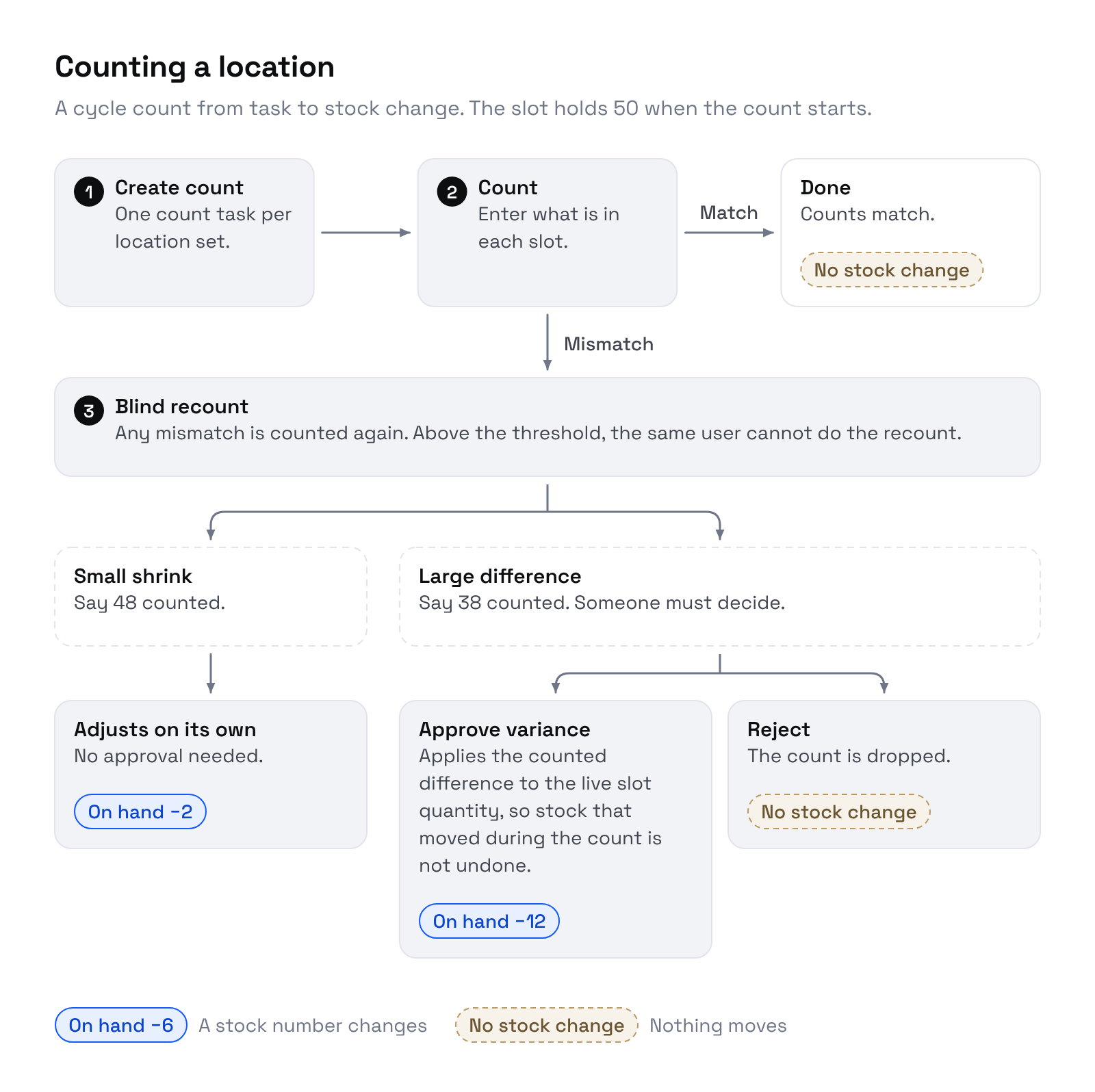
A count list sends someone to a set of slots to count what is really there. Counts are blind: the counter never sees the expected number.
Where
Inventory → Tasks, filter Count list.
Create a count list
- Click Generate….
- Click Generate count list.
Riverr picks up to 15 locations that have a product on them. Fast movers come first, then the locations counted longest ago. The list is sorted along the pick path, so the walk goes aisle by aisle. The task is named Count list #N and shows how many locations it covers.
If no slot has a product on it yet you see No locations with stock to count. Nothing to generate.
A register sale that finds fewer units in an item's bins than it sold also opens a count list for those bins.
Click Print for a paper copy.
Count
- Walk the list. For each line, type what you counted in Counted.
- When every line has a number, click Submit counts.
Every open line needs a number before you can submit. All lines post together.
What happens next
Each line is checked against the slot as it is now, not when the list was made. A pick or batch that took units after you generated the list is not a variance.
| Result | What Riverr does |
|---|---|
| Count matches | Line closes. Nothing changes. |
| Count is off | The line asks for a Blind recount. The box is cleared and no figure is shown. |
Blind recount
Count the slot again and Submit counts.
| Recount | Result |
|---|---|
| Matches the system | Line closes, nothing changes. The first count was the mistake. |
| Matches the first count | The difference is confirmed. See below. |
| Matches neither | Another blind recount is asked for. |
Who can recount
When the recount is 5 or more units away from the system number, someone other than the first counter must do it. The same person gets Someone other than the first counter needs to do this recount. Under 5 units, the same person may recount. The 5 is the Second person needed when a count is off by setting below.
Small and large differences
Once a difference is confirmed:
- Small: Riverr adjusts the slot by the difference and closes the line. By default, small means within the larger of 1 unit or 2.5% of the system number for a shortage, and within the larger of 2 units or 5% for an overage.
- Large: the line stays open for review.
Count settings
Set the limits per warehouse on Settings → Inventory → Warehouse → Bins, in the Counts card:
| Setting | Default |
|---|---|
| Fix a short count on its own up to | 1 unit, or up to 2.5 percent of the slot |
| Fix an over count on its own up to | 2 units, or up to 5 percent of the slot |
| Second person needed when a count is off by | 5 units or more |
Click Save count settings. The page shows Count settings saved.
Approve or reject a large difference
The open line shows the numbers to decide on: System at count, Counted, Difference, and In the slot now.
- Accept count: applies the counted difference to the slot.
- Keep system: the system was right. Nothing changes.
When the difference is at or above the second person setting, Accept count must be clicked by someone who did not count it. The counter gets Someone other than the counter needs to approve this. Anyone may click Keep system.
Either way the line closes. When every line is closed the count list is complete.
Stock that moved during the count
Accept count applies the difference found at count time to the slot as it stands now. Units picked or batched between the count and your approval stay taken. Keep system never writes an old number back, so it does not undo those moves either.
What a count changes
On an item tracked by bin, the bin is the count, so on hand moves with it. On an item that is not tracked by bin, a count only corrects the bin record. On hand stays as the counter has it. See Track by bin.
Count differences are recorded on your side only, in the Variances inbox with From set to Count. A seller is never told about a count.
Remove a count list
Click Remove, give a reason, then Remove task. Counts that were not submitted are not applied.