task
Build the floor
Last updated October 23, 2026
The floor is zone, then aisle, then slot. Each location has one warehouse, and the location picker in the header is its name.
Where
Settings → Inventory → Warehouse
Tabs on this page: Floor, Set locations, Bins, and Tasks. Tasks takes you to Inventory → Tasks. Bins also holds the Counts settings for count lists.
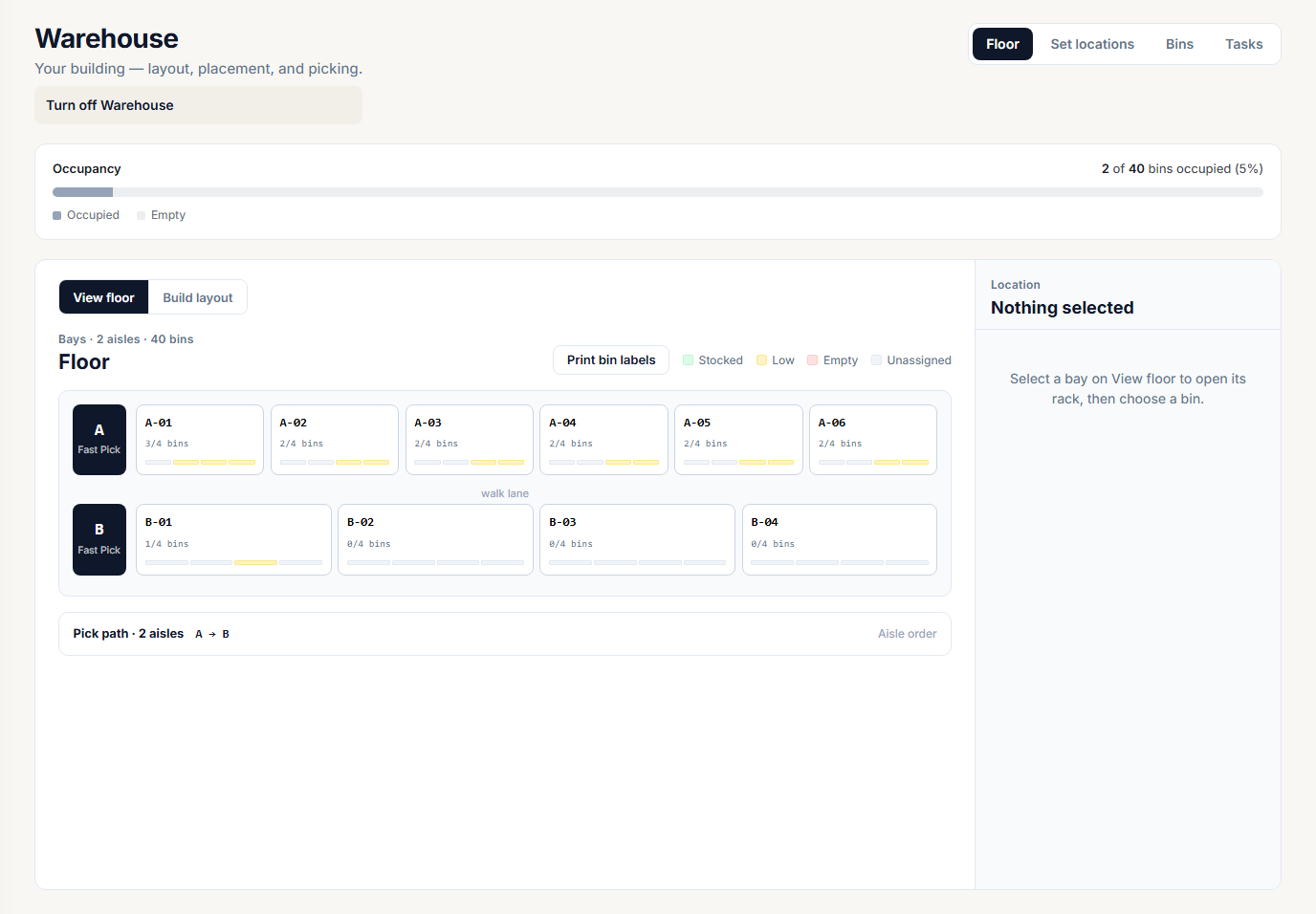
Turn on Warehouse first
If the page shows Enable Warehouse, click it. Riverr creates the warehouse for you. There is no name field and no warehouse dropdown.
You need a location before this works. If you see Add a location first, click Go to Locations, add one, and come back.
Turn off Warehouse sits under the page title. It is refused while the 3PL program is on. Turn that off first under Settings → Inventory → 3PL program.
First time
An empty floor says No bins on this floor yet.
- Stay on the Floor tab.
- Click Build layout (or Go to Build layout).
- Click Add aisle to create bins.
That opens the aisle editor under the Build layout heading.
New aisle
Set the aisle, then the rack, then generate.
- Aisle letter and Zone. Pick a zone or type a new zone name.
- Bays, Levels, and Slots / level.
- Capacity, in tee equivalents: how many tees fit in one slot. Hoodies and jackets count as more than one tee.
- Width, Depth, Base, and Beam thickness, in inches.
- Height (in) for each level. That is the clear opening of the bin, not how high it sits off the floor. Elevation comes from the base, the beams, and the levels below.
- Click Generate aisle.
The left side is a drawing to scale. Reach bands (Stoop, Golden, Overhead, Ladder) come from the middle of each level. Click a level to change its clear height. Click a slot to change its code, height, or capacity.
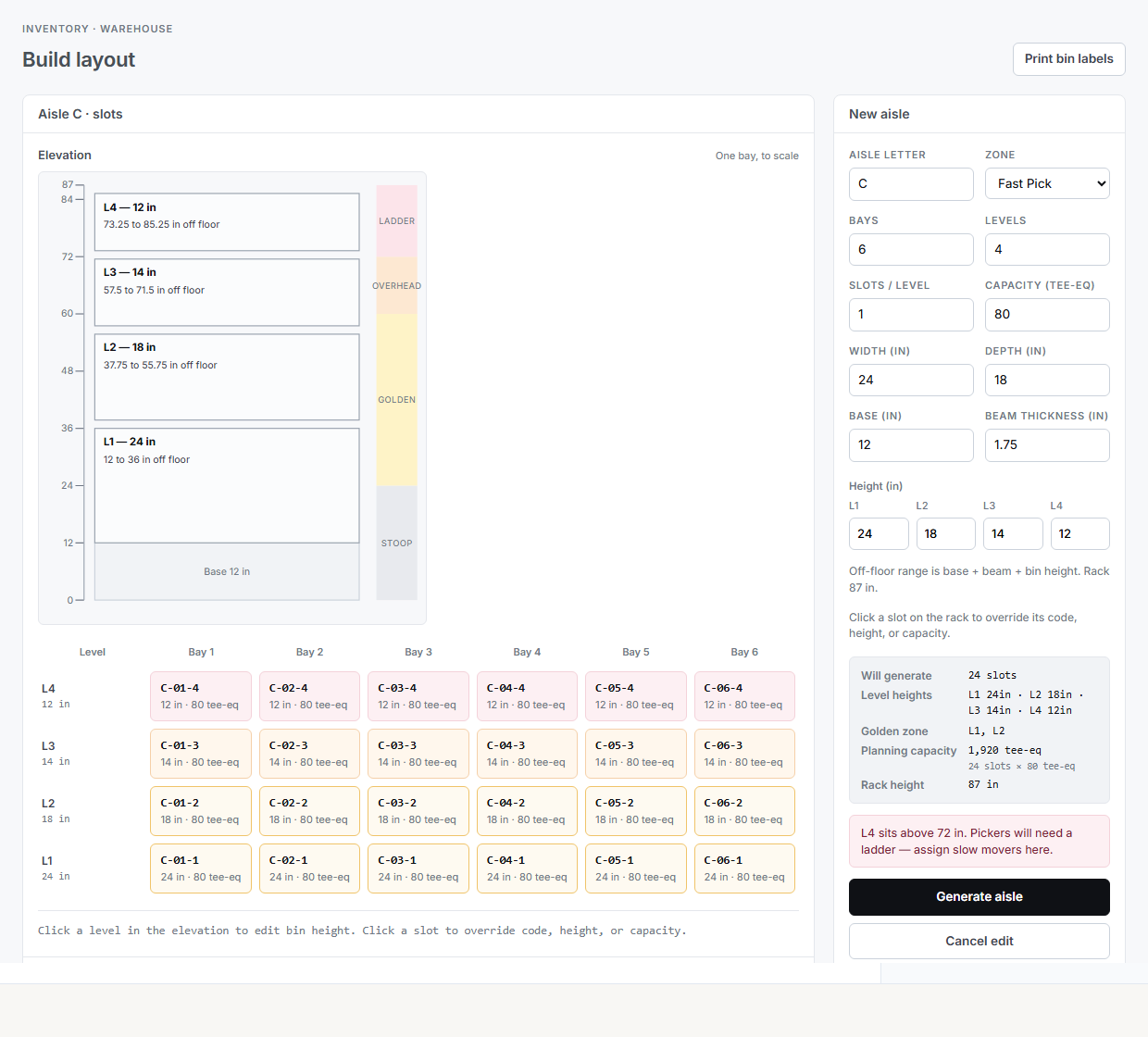
Slot codes read aisle, bay, level, for example A-02-3. That is a shelf, not a shipping tote.
Import bins from a file
Already have your bins in another system? Bring them in instead of building each aisle by hand.
- On Build layout, click Import bins.
- Pick a CSV file with one row per bin. Riverr reads the columns by their names: aisle (or rack when aisle is empty), bay, shelf or level, bin number or position, the bin code, the item SKU, on hand, capacity, and zone. Change any column the dialog got wrong.
- Choose how bins are coded. Keep the codes in the file uses each row's code as it is. Tick the box to drop a prefix every code shares, so
INV-2-1-C-1becomes2-1-C-1. Make codes from your bin names builds the codes from the Bin names settings instead. - Check the preview: the aisles it makes, the new zones, which items it found in your catalog, and the rows that need a look.
- Tick Also set quantities if the on hand column should become each item's count. The change shows in your stock history like any import.
- Click Import.
A shelf can be a letter or a number. If the file uses letters and your bins use numbers, click Use letters in the dialog so new bins match.
Each aisle is sized to the largest bay, shelf, and bin number in the file. Places on those racks that the file does not list are left out unless you untick Only make the bins in the file.
Each bin's item goes in that bin, and its capacity becomes the bin's max. A bin whose item is not in your catalog is still made, just empty. Rows that are not active are skipped. Rows with a problem, such as the same code twice or a code another bin already has, are left out so you can fix them and import again.
Importing the same file again changes nothing that is already there. Right after an import, Undo this import removes what it made.
Print labels before you place stock
Use Print bin labels in the editor or on View floor. Mount the labels first. Stock gets onto slots later, at putaway or on Set locations.
One owner per slot
House stock and seller stock never share a slot. Two sellers never share one either. Putaway and Set locations refuse a mix. That is the rule from What lives in the warehouse.
Zones vs a second building
An overflow room across the street is a zone, not a second warehouse. Zones already sit on the pick path.
A separate facility with its own dock and staff is a second location. Add the location, then switch the header location picker. Do not try to add another warehouse under the same location.
Every warehouse screen follows the location picked in the sidebar: Floor, Bins, Set locations, Inventory → Receiving, and Inventory → Tasks. With more than one warehouse, the Tasks page also shows a Warehouse picker. Generate pick task (stocked) on a batch uses the warehouse at the batch's location.
Next
- Turn on the warehouse program if you hold stock for sellers
- Put blanks on locations if blanks already have stock but no slot